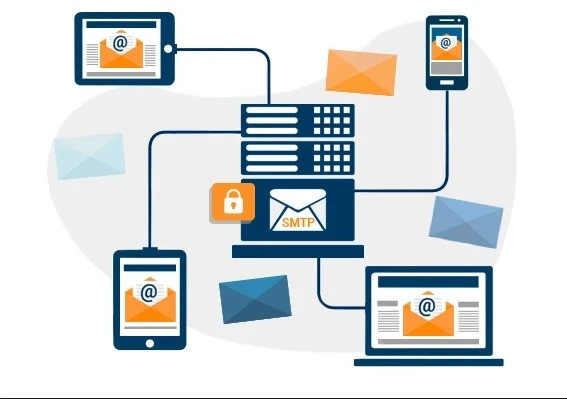
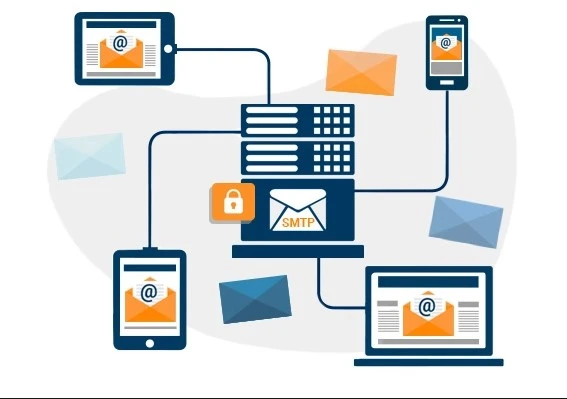
Simple Mail Transfer Protocol (SMTP) is a networking standard for sending email messages.
What is Simple Mail Transfer Protocol (SMTP)?
Simple Mail Transfer Protocol (S M T P) is a technical standard for sending email (electronic mail) across a network.
Like other network protocols, S M T P allows computers and servers to exchange data regardless of the underlying hardware or software.
Just as the use of a standardized envelope addressing format allows the postal service to operate, S M T P standardizes the way email travels from sender to recipient, making large-scale email delivery possible.
S M T P is a mail delivery protocol, not a mail retrieval protocol. The postal service delivers mail to a mailbox, but the recipient still has to retrieve the mail from the mailbox. Similarly, SMTP delivers email to an email provider's mail server, but separate protocols are used to retrieve that email from the mail server so the recipient can read it.
How does S M T P work?
All network protocols follow a predefined process for exchanging data. S M T P defines the data exchange process between an email client and a mail server. An email client is what the user interacts with: the computer or web application through which they access and send emails. A mail server is a specialized computer for sending, receiving, and forwarding emails; users do not interact directly with mail servers.
The following is a summary of what passes between an email client and a mail server to initiate sending an email:
- SMTP connection opened: Since S M T P uses Transmission Control Protocol (TCP) as its own transport protocol, this first step begins with a TCP connection between the client and the server. After that, the email client starts the email sending process using a specialized “Hello” command (HELO or EHLO, described below).
- Email data transfer: The client sends the server a series of commands accompanied by the actual content of the email: the email header (including the destination and subject line), the body of the email, and any additional components.
- Mail Transfer Agent (MTA): The server runs a program called a Mail Transfer Agent (MTA). The MTA checks the domain of the recipient's email address, and if it differs from the sender's address, it queries the Domain Name System (DNS) to find the recipient's IP address. This is similar to a post office looking up the zip code of a mail recipient.
- Connection closed: The client notifies the server when the data transfer is complete, and the server closes the connection. At this point, the server will not receive additional email data from the client unless the client opens a new SMTP connection.
Typically,
this first email server is not the actual final destination of the email. The server, after receiving the email from the client, repeats this SMTP connection process with another mail server. The second server does the same, until the email finally arrives in the recipient's inbox on a mail server controlled by the recipient's email provider.
Compare this process to the way a piece of mail travels from a sender to a recipient. A mail carrier does not take a letter directly from the sender to the recipient. Instead, the mail carrier returns the letter to their post office. The post office ships the letter to another post office in another city, then another, and so on until the letter reaches the recipient. Similarly, emails travel from server to server via S M T P until they reach the recipient's inbox.
What is an SMTP envelope?
An SMTP “envelope” is the set of information that an email client sends to a mail server about the source of the email and where it is going. The SMTP envelope is different from the email's address and body and is not visible to the email recipient.
What are SMTP commands?
SMTP commands are predefined text instructions that tell the client or server what to do and how to handle any accompanying data. Think of them as buttons the client can press to make the server accept data correctly.
HELO/EHLO: These commands say “Hello” and initiate the SMTP connection between the client and the server. ”HELO” is the basic version of this command; ”EHLO” is for a specialized type of SMTP.MAIL FROM: This tells the server who is sending the email. If Alice is trying to send an email to her friend Bob, the client might send “MAIL FROM: <[email protected]>”.RCPT TO: This command is for listing the email recipients. The client can send this command multiple times if there are multiple recipients. In the example above, Alice's email client sends “RCPT TO: <[email protected]>”.DATA: This precedes the email content, such as:
DATA
Date: Mon, 4 April 2022
From: Alice [email protected]
Subject: Eggs benedict casserole
To: Bob [email protected]

Hi Bob,
I will bring the eggs benedict casserole recipe on Friday.
-Alice
.
RSET: This command resets the connection, removing all previously transferred information without closing the SMTP connection.RSETis used if the client sent incorrect information.QUIT: This ends the connection.
What is an SMTP server?
An SMTP server is a mail server that can send and receive email messages using the SMTP protocol. Email clients connect directly to the email provider's SMTP server to initiate sending an email. Several different programs run on an SMTP server:
- Mail Submission Agent (MSA): The MSA receives email messages from the email client.
- Mail Transfer Agent (MTA): The MTA transfers email messages to the next server in the delivery chain. As described above, it may query DNS to find a mail exchange (MX) DNS record for the receiving domain if necessary (MX).
- Mail Delivery Agent (MDA): The MDA receives email messages from MTAs and stores them in the recipient's email mailbox.
What port does SMTP use?
In networking, a port is the virtual point where network data is received; think of it as the apartment number in a piece of mail's address. Ports help computers sort network data to the correct applications. Network security measures such as firewalls can block unnecessary ports to prevent malicious data from being sent and received.
Historically, SMTP only used port 25. Today, port 25 is still used for SMTP, but it can also use ports 465, 587, and 2525.
- Port 25 is most commonly used for communications between SMTP servers. End-user network firewalls often block this port today, as spammers try to abuse it to send large amounts of spam.
- Port 465 was once designated for use by SMTP with Secure Sockets Layer (SSL) encryption. But SSL has been replaced by Transport Layer Security (TLS), so modern email systems do not use this port. It only appears in legacy (older) systems.
- Port 587 is now the default port for sending email. SMTP connections over this port use TLS encryption.
- Port 2525 is not officially associated with SMTP, but some email services offer SMTP delivery over this port in case the ports mentioned above are blocked.
SMTP vs. IMAP and POP
Internet Message Access Protocol (IMAP) and Post Office Protocol (POP) are used to deliver email to its final destination. An email client must retrieve the email from the final mail server in the chain to display the email to the user. The client uses IMAP or POP instead of SMTP for this purpose.
To understand the difference between SMTP and IMAP/POP, consider the difference between a wooden board and a rope. A length of wood can be used to push something forward, but it cannot pull it inward. A rope can pull an object, but it cannot push it. Similarly, SMTP “pushes” email to a mail server, but IMAP and POP “pull” it the rest of the way to the user's application.
What is Extended SMTP (ESMTP)?
Extended Simple Mail Transfer Protocol (ESMTP) is a version of the protocol that expands its original capabilities, enabling the sending of email attachments, the use of TLS, and other capabilities. Almost all email clients and email services use ESMTP, not basic SMTP.
ESMTP has some additional commands, including ” EHLO”, an “extended greeting” message that enables the use of ESMTP at the start of the connection.
And here, my friend, we have successfully completed the mission 
With greetings from the #Ezznology team
Find what you need at #our store
To subscribe to our newsletter on Google News click here 👇👇

Or scan the code