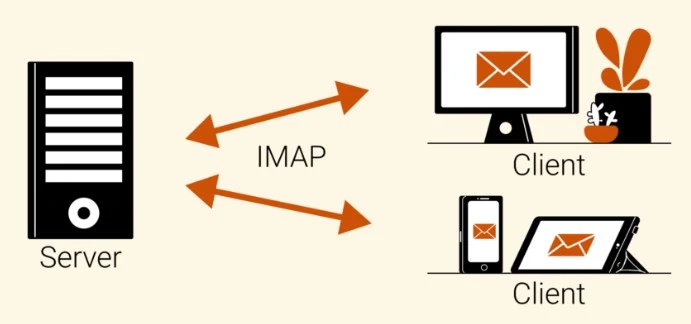
Internet Message Access Protocol (IMAP) is an email receiving protocol that allows users to access their emails from different devices.
What is the IMAP Protocol?
Internet Message Access Protocol (IMAP) is an email receiving protocol. Protocols standardize technical processes so that computers and servers can communicate with each other regardless of whether they use the same hardware or software.
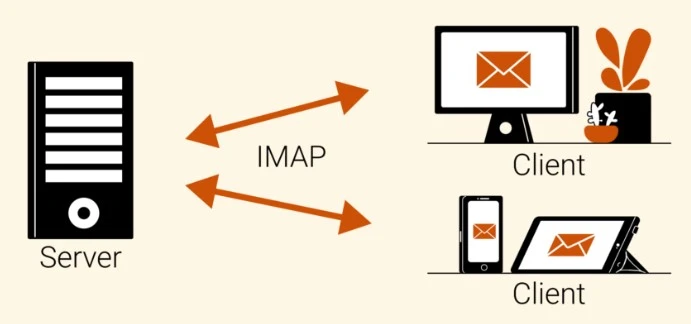
The main feature of IMAP is that it allows users to access their emails from any device. This is because IMAP acts as an intermediary between email servers and email clients, rather than downloading emails from the server to the email client.
Compare this aspect of IMAP with the differences between using Microsoft Word and Google Docs. Microsoft Word documents are saved locally on a computer and can be transferred via email attachments or USB drives, but they are not dynamically updated. If Sally, for example, makes changes to her Word document, those edits will only be saved on Sally's computer (and not on the version that Linda may have on her own computer).
In comparison, Google Docs can be accessed online from different devices and updated dynamically when a user makes changes to a file. In this scenario, any change Sally makes to a shared file would be visible to Linda, even if they are using different computers to access the same document.
Similarly, using IMAP, users can access their email accounts from different devices without any differences in experience, and they do not necessarily need to be on the device on which they originally read the email.
What is the POP3 Protocol?
Post Office Protocol Version 3 (POP3) is an alternative email receiving protocol that downloads emails from the server to a local device. With POP3, the recipient cannot access their emails again from a different device because they are stored locally and then deleted from the email server.
IMAP vs POP3
The following is a summary of some of the key differences between IMAP and POP3.
| IMAP | POP3 |
|---|---|
| Users can access their emails from any device. | By default, emails can only be accessed from the device on which they were downloaded. |
| The server stores the emails; IMAP acts as an intermediary between the server and the client. | Once downloaded, emails are deleted from the server, unless configured otherwise. |
| Emails cannot be accessed offline. | Emails can be accessed offline but only on the device on which they were downloaded. |
| Email bodies are not downloaded until the user clicks on them, but subject lines and sender names are quickly populated in the email client. | Emails are downloaded to the device by default, so loading messages may take longer. |
| IMAP requires more server space because emails are not automatically deleted from the server. | POP3 conserves email server storage because emails are automatically deleted from the server. |
How does sending and receiving emails work with IMAP?
Here is a quick look at the process of sending and receiving emails using IMAP*:
Sending emails: Simple Mail Transfer Protocol (SMTP) specifies how emails are sent.
- A Transmission Control Protocol (TCP) connection is established between the client and the email server. This connection lets the server know to expect an email.
- The client sends a series of commands to the server, which include the email itself.
- The email server uses its own program called a Mail Transfer Agent (MTA) to check the Domain Name System (DNS) record of the email and find the recipient's IP address. The MTA translates the DNS record into an IP address so it knows where to send the emails.
- SMTP looks for the Mail Exchange (MX) record associated with the recipient's domain name. (The MX record is used to indicate how messages should be routed according to SMTP.) If there is an MX record, the email will be sent to the corresponding email server.
Retrieving emails: IMAP protocol specifies how emails are received.
- Email can be accessed through the email client and can be read from any device. Since IMAP is an intermediary between the email client and the server, these emails can only be accessed through an internet connection.
- When a user logs into their email client, the client connects to the email server to retrieve their messages. The user can see a preview of the email (with the subject line and sender information) but the actual message is not downloaded until the user clicks on the message.
- The inbox owner's emails will remain available via the server-client connection until they are deleted.
* Note that for the purposes of this example, IMAP is used to describe email retrieval. However, this process looks slightly different when implementing the POP3 protocol.
What are some security considerations for IMAP?
With IMAP, emails are stored on the server by default,
which can cause problems in the event of a server breach.
However, unlike POP3, there is no need to worry about their emails being destroyed
in the event that the device on which they were downloaded is lost or damaged.
Also:
One of the biggest security issues with IMAP access is that it transmits logins
from the client to the server in plain text by default, meaning that usernames and passwords
are unencrypted. (Encrypted login is obscured using complex mathematical equations
so that an attacker cannot understand them simply by reading them.)
This vulnerability can be protected against by configuring IMAP over Transport Layer Security (TLS),
which facilitates encrypted communication.
Also:
Another vulnerability associated with IMAP is that it is not inherently compatible with multi-factor authentication (MFA).
For this reason, IMAP can be exploited to bypass MFA requirements
and facilitate successful password spraying attacks for attackers. (In a password spraying attack,
the attacker tries different combinations of commonly used passwords
and potential usernames.) Using third-party email clients
that do not support authentication requirements or maintaining shared email accounts
that cannot enforce MFA makes organizations particularly vulnerable.