
What Does Search Engine Result Pages Explained|SERP Mean

Search engine results pages (also known as “SERPs” or “SERP“) are Google’s response to a user’s query. Search results in SERPs typically include organic search results, paid Google ad results, featured snippets, knowledge graphs, and video results.
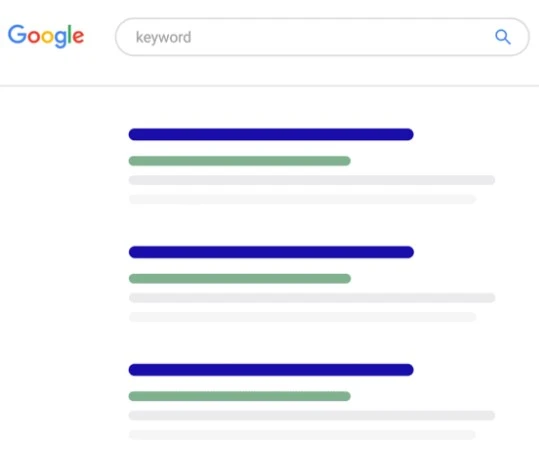
Although Google now includes dozens of search engine results page (SERP) features that appear on the first page, the two most important categories are paid results and organic results.
- Paid Results: These are keyword-based ads that advertisers pay to display, and they typically appear at the top and bottom of the page.
- Organic Results: These are web pages that Google’s algorithmic system believes are most relevant to the search topic, and their owners do not pay any money for them to appear.
While other SERP features such as featured snippets and knowledge panels can be influential, paid results and organic results form the foundation of the search results users see.
What Does Search Engine Result Pages Explained|SERP Mean
Also:
Paid Results: These are results advertised by advertisers through bidding on keywords via the Google Ads advertising system. Although the bidding system takes ad relevance into account, the best bid (highest amount paid) typically gets the best position.
Organic Results: These positions are earned through search engine optimization (SEO) to align with Google’s algorithms, which determine the best and most relevant results for various searches.
The Importance of Search Engine Results Pages (SERPs) for Search Engine Optimization (SEO):
Search engine results pages play a pivotal role in determining your site’s visibility on Google’s first page. For example, suppose your site ranks first in search results for the keyword “how to create a website.” That’s great… until you realize that SERP features push the first result below the fold.
This illustrates how important it is to understand the components of search engine results pages and how to leverage them to improve your site’s ranking in organic results, as these results typically enjoy greater trust and engagement from users compared to paid ads.
Also:
In today’s world, SERP features like featured snippets provide direct answers to users on the first page of search results. Some may wonder why they would click on traditional blue links if the answer is right in front of them.
That’s why it’s important to target keywords that don’t have many SERP features. This way, your result will stand out and users will click on it more.
Typical Search Engine Results Page (SERP) Elements:
- Organic Search Results: These results are determined by Google’s complex algorithm that relies on more than 200 ranking signals. Although the algorithm is confidential, Google has publicly confirmed some key ranking factors, including:
- Off-page SEO factors (the number of websites that link to a specific page, also known as “backlinks”)
- On-page SEO factors (the keywords you use on your page)
- Website loading speed
- User trust in your brand
- Typical Organic Search Result Snippets:
- Page title (title tag)
- Page URL
- Meta description
It is important to note that this is just a brief glimpse into the world of search engine optimization (SEO). To achieve outstanding results, one needs an in-depth understanding of the various SERP components and advanced SEO strategies.
Would you like to discuss SEO strategies for your website?
Also:
What is a Search Engine Results Page (SERP)?
A search engine results page (SERP) is the page you see after entering your query in a search engine such as Google, Yahoo, or Bing. The SERP design varies for each search engine, but since Google is the most popular search engine, we will focus on its features and algorithms.
What Are the Different Types of Search Queries?
The SERP features that appear after a search depend on the type of search query entered. Search queries generally fall into one of the following three categories:
- Navigational: People are looking for a specific website but do not type the full URL.
- Informational: People are looking for information about a topic.
- Transactional: People are looking to buy something.
Paid Ads vs. Organic Listings
Paid ads and organic listings look very similar on Google’s SERP. Paid ads are typically placed at the top of the page, while organic listings are obtained through search engine optimization (SEO).
What Are SERP Features?
Today’s search engine results pages are more visually diverse than they were in previous years. In addition to general search results that display only the site name and metadata, searches can also return images, shopping suggestions, tweets, and information cards.
Best store to buy nutritional supplements in Kuwait
Best store for social media services and account fame
Here Are Some of the Most Common SERP Features:
- Google Ads: Paid ads that appear at the top or bottom of the SERP.
- Featured Snippet: A box that appears on the SERP separately from the search results list, containing content from the website that includes the searched keywords.
- Image Pack: A row of images and a link to navigate to Google Image Search.
- In-Depth Articles: Long-form articles containing evergreen content.
- Knowledge Card: A box on the SERP that displays specific facts about the search topic, similar to a condensed Wikipedia page.
- Knowledge Panel: A more specific knowledge card for a particular entity.
- Local Pack: A map with pins pointing to businesses that may be relevant to the search term.
- Local Justifications Pack: A local pack that includes more information about each business.
- News Box: A box displaying recent news related to the search query.
- Related Questions: A list of questions people frequently ask about the search term.
- Reviews: Review data, displayed as star ratings, may appear on the SERP after a commercial query.
- Shopping Results: Products related to the search query.
- Sitelinks: Links to specific pages within a website.
- Tweets: Tweets related to the search query.
- Video: Video clips related to the search query.
In Summary:
The more you know about search engine results pages (SERPs), the better you can strategize your site’s content and design to achieve a higher ranking in search results. By understanding the different types of search queries, paid ads versus organic listings, and the various SERP features, you can build a website that is more likely to be seen by your target audience.
And with that, my friend, we have successfully completed the mission 
And don’t forget your brothers in Gaza in your prayers
With greetings from the #Ezznology team
And find what interests you at #our store
To subscribe to our newsletter on Google News click here👇👇

Or scan the code